What the Heck is Loop Engineering?
When I first heard the phrase "loop engineering," my first thought was: great, another buzzword to add to the pile.
Then two of the people who build the best coding agents in the world said the same odd thing. They barely prompt their agents anymore.
Boris Cherny, head of Claude Code at Anthropic:
"I don't prompt Claude anymore. I have loops running that prompt Claude and figuring out what to do. My job is to write loops."
Peter Steinberger, creator of OpenClaw, says it as a flat instruction:
"You shouldn't be prompting coding agents anymore. You should be designing loops that prompt your agents."
So I rolled my eyes, then I went and tried it. After a couple of weeks of actually building loops instead of dismissing the idea, it clicked hard. It is now the biggest change to how I work with agents this year, and it has quietly saved me hours every week. So let me explain what the heck it actually is.
So What Is It?
There is a name for this now. Addy Osmani recently called it loop engineering. The idea is simple once you see it.
You stop being the person who prompts the agent. You build the system that does the prompting instead.
A loop is a recursive goal. You set a target, and the agent keeps iterating until it hits it. You design that system once, and then it runs without you sitting in the chair for every turn.
I am still a little skeptical, and I will say up front: watch your token costs. They can run away fast, and what feels cheap when you are token rich gets painful when you are not. But the core idea earned its place. It is not hype.
From Holding the Tool to Building the Machine
For about two years, getting something out of a coding agent meant one thing. You wrote a good prompt, gave it enough context, read what came back, then typed the next thing. The agent was a tool, and you were holding it the whole time, one turn after another.
That is the part that changed for me.
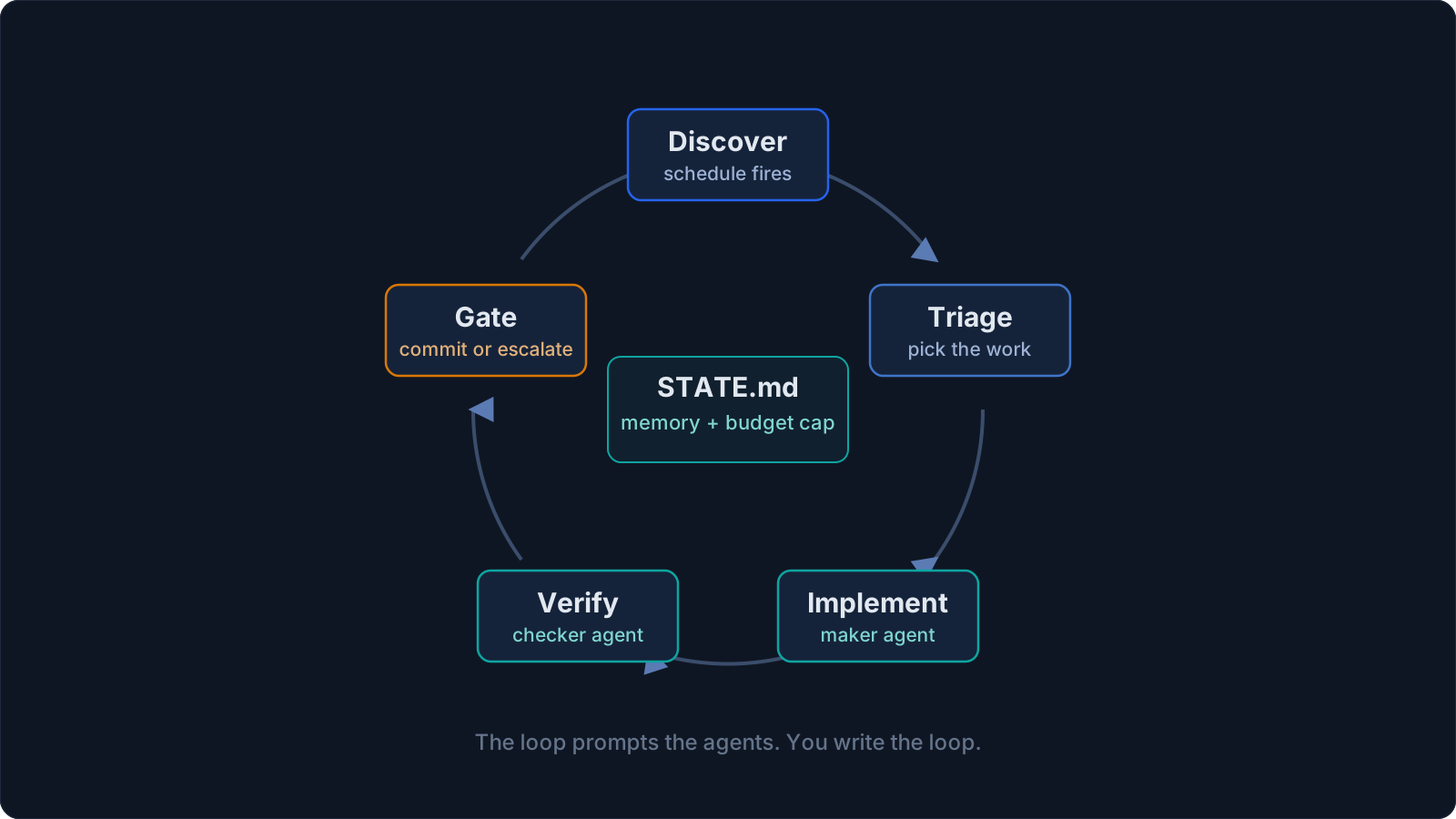
Now I build a small system that finds the work, hands it out, checks it, writes down what is done, and decides the next thing. Then I let that system poke the agents instead of me. The first time a loop fixed a flaky test, opened a clean PR, and pinged me only at the end, I realized how much agent babysitting I had been doing by hand.
This sits one floor above harness engineering. The harness is the environment a single agent runs inside: its tools, memory, and guardrails. A loop is that harness on a timer. It spawns helpers, and it feeds itself.
It Is Not a Custom Hack Anymore
The thing that flipped me from skeptic to convert was realizing this stopped being a pile of bash I had to babysit.
A year ago, building a loop meant writing your own scripts, cron jobs, and glue code, then maintaining that private setup forever. Now the same pieces are becoming product features: schedules, goals, skills, connectors, sub-agents, and isolated worktrees.
You are no longer hacking together a loop from scratch. You are assembling one from parts the tools already ship. The same loop I describe below runs in the Codex app, and almost the same one runs in Claude Code.
Once I noticed the shape is the same in both, I stopped arguing about which tool. I just design a loop that works no matter which one I am sitting in.
The Six Pieces
After building a few of these, every loop I trust comes down to six pieces. State is not an optional add-on. It is the part that lets the loop remember what happened and continue across runs.
| Piece | Its job in the loop | Codex | Claude Code |
|---|---|---|---|
| Automations | Discovery and triage on a schedule | Automations tab, /goal | Scheduled tasks, /loop, /goal, hooks, GitHub Actions |
| Worktrees | Isolate parallel work | Built-in worktree per thread | git worktree, --worktree, isolation: worktree |
| Skills | Codify project knowledge | Agent Skills (SKILL.md) | Agent Skills (SKILL.md) |
| Plugins / connectors | Reach your real tools | Connectors (MCP) and plugins | MCP servers and plugins |
| Sub-agents | One makes, one checks | Subagents in .codex/agents/ | Subagents in .claude/agents/, agent teams |
| State | Remember what is done | Markdown or Linear | Markdown or Linear |
The names differ here and there, but the capability is the same. What matters is how each piece behaves in practice, because this is where a loop either becomes reliable or turns into another thing you have to babysit.
Automations are the heartbeat. They are what make a loop an actual loop, not a one-off run. You pick a project, a prompt, a cadence, and where it runs. Findings land in a triage inbox, and runs that find nothing archive themselves. Two in-session primitives are worth knowing. /loop reruns a prompt on a cadence. /goal keeps going until a condition you wrote is actually true, and after each turn a separate small model checks whether you are done. That detail mattered to me: the agent that wrote the code is not the one grading it. I give it something like "all tests in test/auth pass and lint is clean" and walk away.
Worktrees stop parallel from turning into chaos. The moment I ran more than one agent, files started colliding. Two agents editing the same file is the same headache as two engineers committing to the same lines without talking. A git worktree is a separate working directory on its own branch, sharing the repo history, so one agent's edits cannot touch another's checkout.
Skills stop you re-explaining your project every session. A skill is a folder with a SKILL.md inside, holding the instructions the agent reads every run. Without skills, my loop re-derived the whole project from zero every cycle. With them, the knowledge compounds. I wrote more about this format in skills, CLI, and MCP. One distinction matters here: a skill is the instruction format the agent reads, while a plugin is the package that lets you distribute those skills and related tools across repos.
Connectors let the loop touch your real tools. A loop that can only see the filesystem is a tiny loop. Connectors, built on MCP, let the agent read your issue tracker, query a database, hit a staging API, or drop a message in Slack. This is the difference between an agent that says "here is the fix" and a loop that opens the PR, links the ticket, and pings the channel once CI is green.
Sub-agents keep the maker away from the checker. The most useful structural move in a loop is splitting the one who writes from the one who checks. The model that wrote the code is far too kind grading its own homework. A second agent, sometimes a different model, catches what the first one talked itself into. Inside a loop this is not optional, because the loop runs while you are not watching, and a verifier you trust is the only reason you can walk away. I made this case in self-improving harnesses: trust the gate, not the agent's opinion of its own work.
State is the spine. Every loop needs a persistent place to track what is done, what is still open, and what should happen next. That can be a markdown file, a Linear board, a GitHub issue, or anything else the agent can read and update across runs. The important part is that the state lives outside the conversation. The chat context disappears. The repo does not.
Tips If You Want to Try Your First Loop
- Start report-only. Let the loop tell you what it would do before it does anything. Promote it to action only after it earns your trust. This is what kept my first loop from doing something dumb.
- Pick one boring job. PR triage, dependency bumps, flaky-test sweeps, changelog drafts. Bounded work with a clear right answer.
- Always pair a maker with a checker. A loop with no verifier is the most expensive mistake here. Make the agent that does the work different from the one that approves it.
- Cap the budget before you start. Decide the token or run limit up front, not after the bill arrives. Loops fail quietly and spend loudly.
- Give it a state file. A loop with no memory repeats itself. A file it reads and writes each run turns a stateless agent into one that makes progress across days.
- Isolate every run in a worktree so parallel agents and your own work never collide.
- Write the stop condition like it matters. "Stop when every PR has a verdict" is a loop. "Keep improving the code" is a runaway.
What the Loop Still Will Not Do for You
The loop changed my work. It did not delete me from it. Three things actually got sharper once my loops got good, not easier.
Verification is still on me. A loop running unattended is also a loop making mistakes unattended. Splitting the checker from the maker is what makes the loop's "it is done" mean something, and even then "done" is a claim, not a proof. My job is still to ship code I confirmed works.
Your understanding rots if you let it. The faster the loop ships code you did not write, the bigger the gap between what exists and what you actually grasp. A smooth loop just grows that gap faster unless you read what it made.
The comfortable posture is the dangerous one. When the loop runs itself, it is tempting to stop having an opinion and take whatever it hands back. A loop helps when you design it with judgment: clear targets, real verification, and limits on what it can do without you. It hurts when you use it to avoid thinking. The action looks the same in both cases, but the result is completely different.
Two people can build the exact same loop and get opposite outcomes. One uses it to move faster on work they understand deeply. The other uses it to avoid understanding the work at all. The loop does not know the difference. You do.
Build the Loop, Stay the Engineer
So, what the heck is loop engineering? It is the move from prompting the agent yourself to building the small system that prompts it for you. I came in a skeptic. After actually living with it, I am sold on the idea and still careful about the cost.
If I stopped reviewing the code myself and leaned entirely on automated loops to fix things, my product's quality would suffer, and I would dig a deeper hole each cycle. So go ahead and set up your loops. Just remember that prompting your agents directly still works too. It is about finding the balance.
This is why loop design is harder than prompt engineering, not easier. You are no longer just writing one good instruction. You are deciding what the system should aim at, how it proves the work is done, when it should stop, and how much it is allowed to spend. The work did not disappear. It moved up a level.
Build the loop. But build it like someone who intends to stay the engineer, not just the person who presses go.
Enjoyed this post?
If this brought you value, consider buying me a coffee. It helps me keep writing.